
Commercial AE's guide to Sumble: Prioritize your book, find the hook, close the deal


You have 200+ accounts in your book. You know maybe 20 of them well. The rest? You're guessing.
You tried sending volume. A thousand emails last month with a template. Nothing. You tried AI to personalize at scale. Still ghosted. Because personalization doesn't get replies. Relevance does.
With 200+ accounts and a 60-90 day sales cycle, you can't research every account deeply. But you also can't afford to miss the ones that are actually in-market right now. The account that's #187 on your list might be the one where a deal can be won this quarter - you just don't know it yet.
So you either spray and pray, or you spend all your time on the same 20 accounts and hope for the best.
What if you could find the non-obvious accounts where deals are hiding, and get the relevant hook in 10 seconds instead of 10 minutes?
What Sumble does
Sumble shows you what your target accounts are actually building, buying, and hiring for. It reads job posts and turns them into tech signals, org data, and people intelligence, all the way down to the specific teams that matter. So you get the relevance hook you need without opening six tabs. GTM teams at Snowflake, Figma, Elastic, Wiz, and Vercel use it today.
Here's what that looks like: we know Disney's AI engineering team is building a GenAI project to personalize guest experiences with conversational AI. The project is likely led by Adam Kirstein. We know this because we read it in their job posts, and we show you the source.
That's your relevance hook. One click, not six tabs.
Start here: Upload your account list
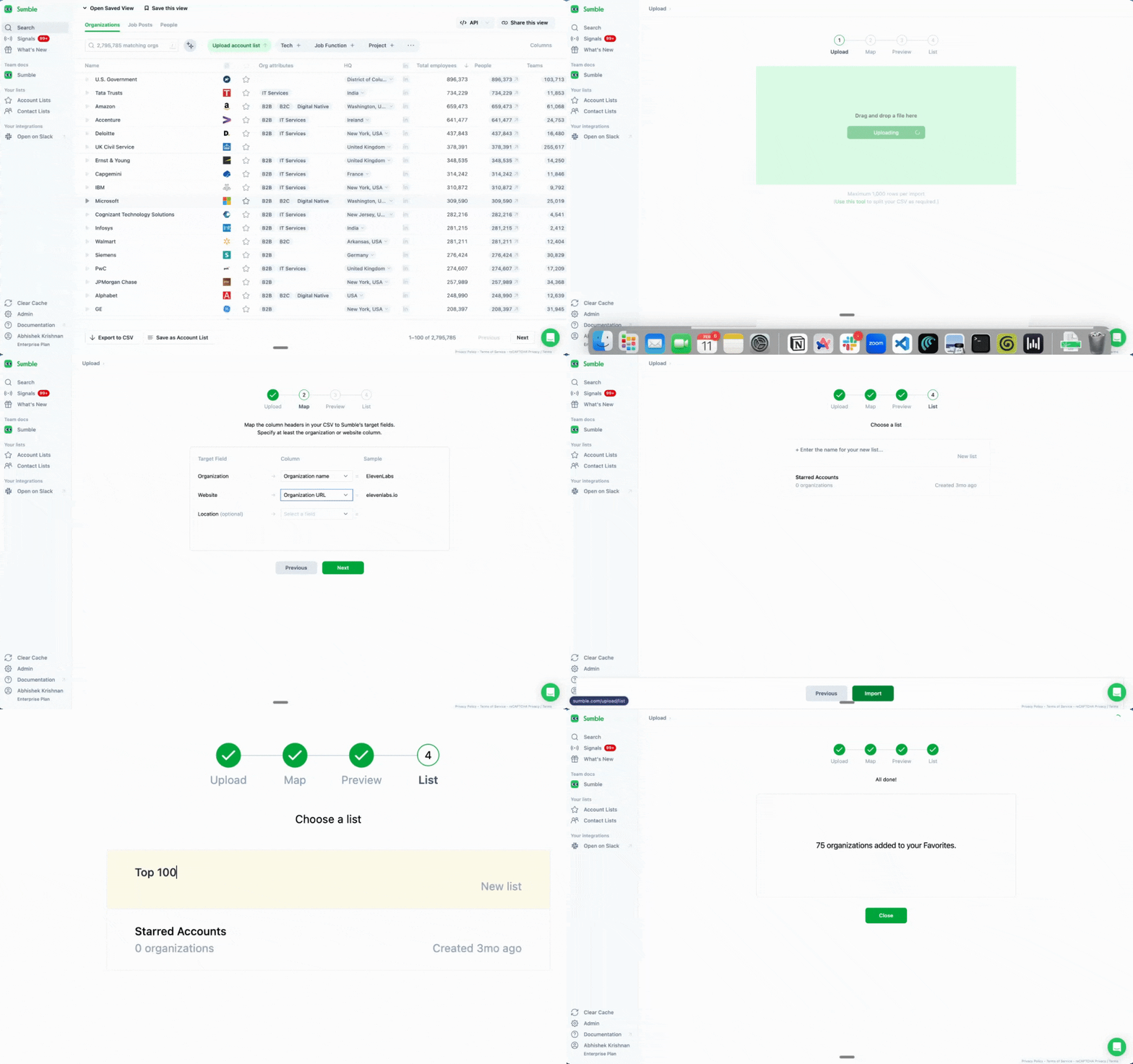
Get your accounts into Sumble first.
Go to sumble.com, sign up with your work email, upload your named accounts. CSV works. Copy-paste works. You can also filter by HQ location - put in your GEO (city or state) to find accounts in your territory. Just get them in.
Once your accounts are loaded, every feature below works on your specific book. Not the whole internet. Your accounts, with hooks you can use right now.
Tech filter: Turn 200 accounts into the 30 that matter today
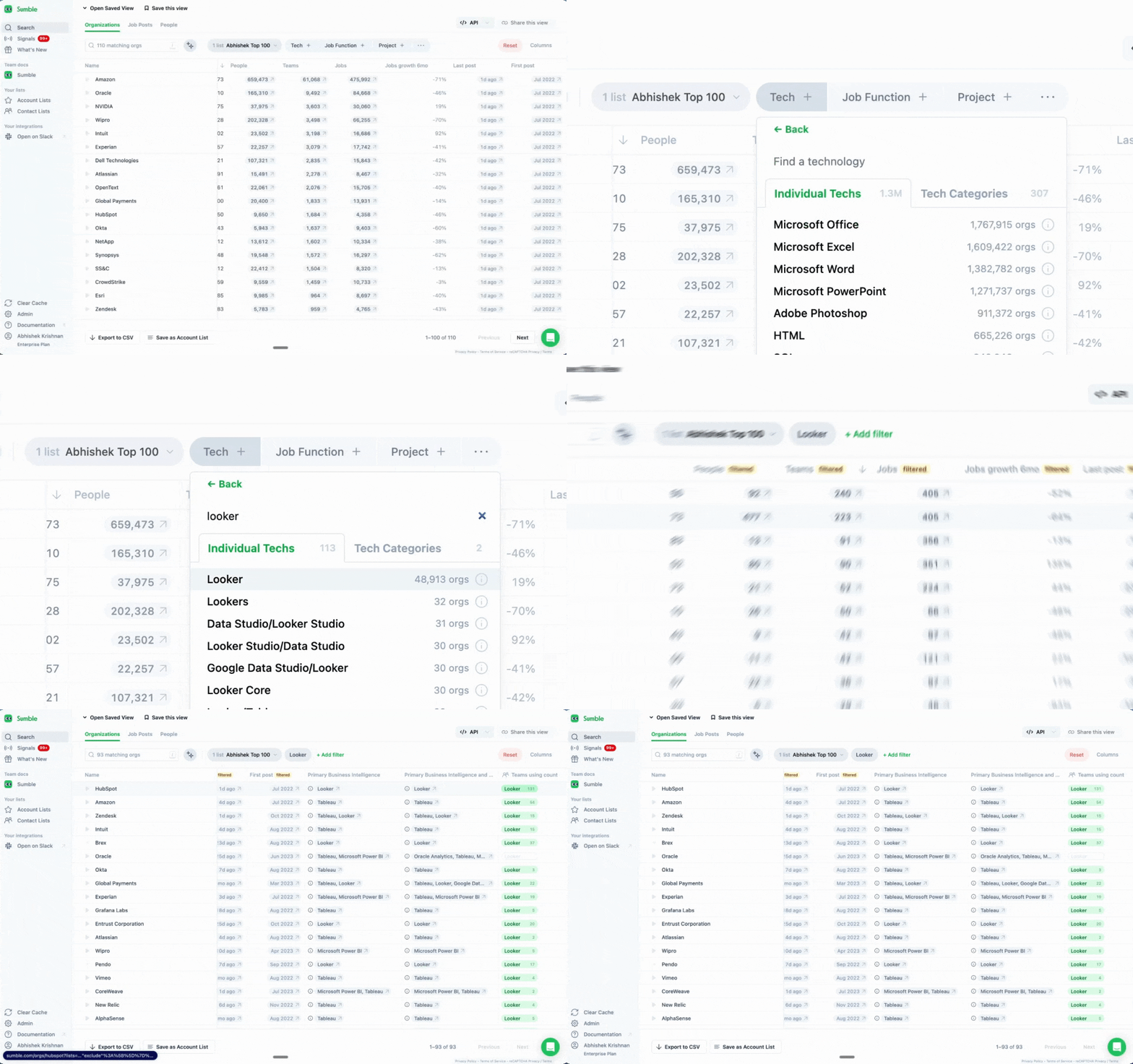
Find the accounts that are already using what you compete with.
You sell a BI tool? Filter for companies using Looker, Tableau, or Power BI. Sell security software? Find accounts running Splunk or CrowdStrike.
In mature markets, 85-90% of deals are replacements. Your buyer isn't starting from scratch. Knowing what they currently use gives you the hook for your first line.
Instead of guessing, you open Sumble, filter by tech, and get a list of accounts that are actually relevant. That's your prospecting list for the day.
How to use it:
- Go to your account list
- Apply the Tech Filter
- Select competing or complementary technologies
- See which accounts match
You just turned 200 accounts into the 30 that matter today. Start there.
Projects: Spot the accounts that are actually buying right now
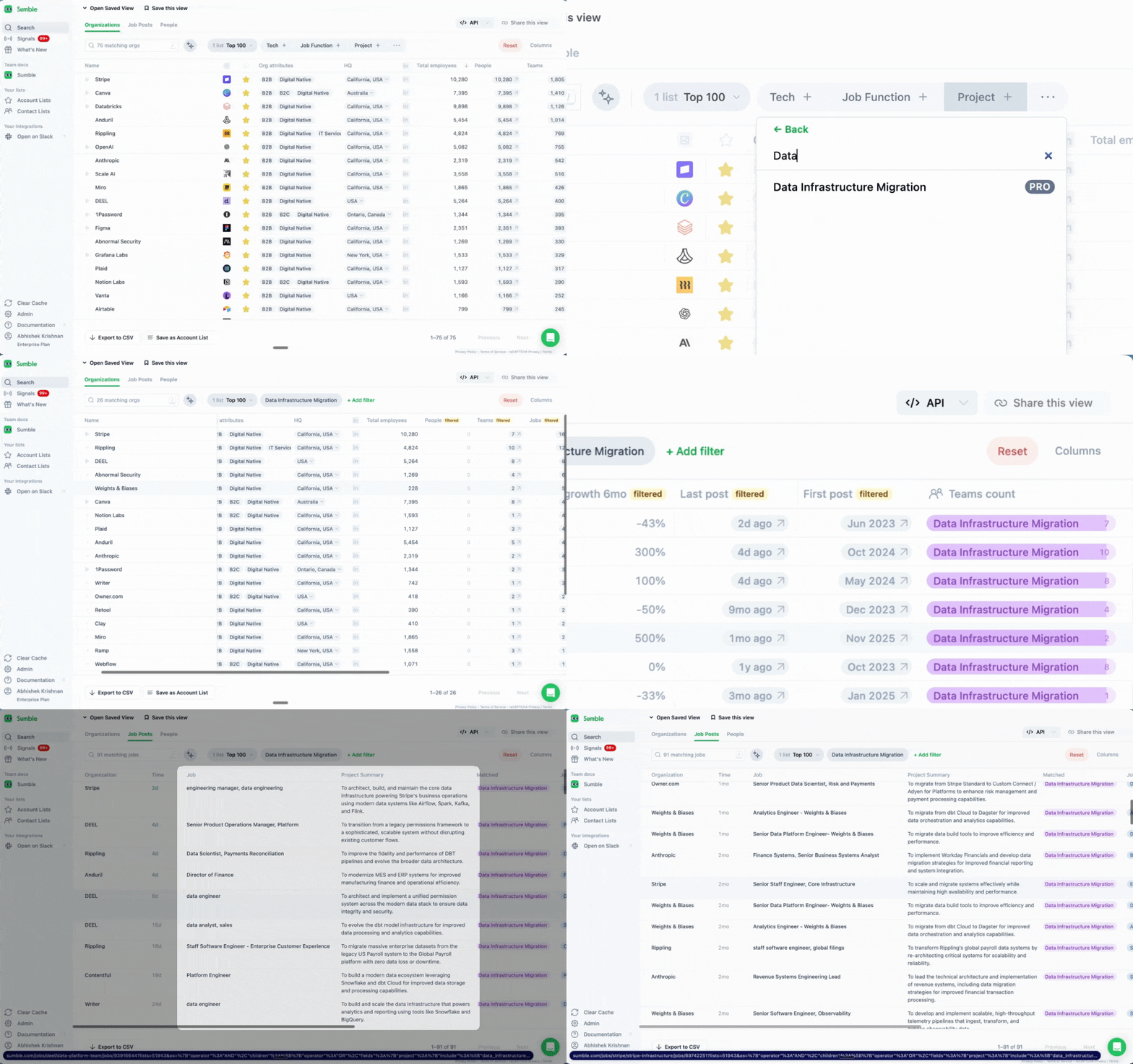
Find accounts with active initiatives you can help with.
A company hiring a Data Infrastructure Engineer to "migrate from on-prem to cloud data warehouse"? That's a project. Hiring a Security Engineer to "consolidate SIEM vendors"? Also a project. Sumble extracts these from job posts and tells you what's happening.
This is your fastest relevance trigger. The "first is best" rule: run your list of research triggers top to bottom, use the first one you find to write the email.
An active project is almost always the best trigger. It means there's budget, there's urgency, and there's someone who needs help.
How to use it:
- Filter your accounts by project type
- Click into a project to see the source job post
- Grab the hook: the project name, the team, the likely lead
- Use Draft Outreach to generate a message referencing the project
You now have a relevance paragraph that makes your email feel researched. Add it to the top of your template, keep the rest of the email the same. Done.
Tech stack: The one-liner that earns the reply
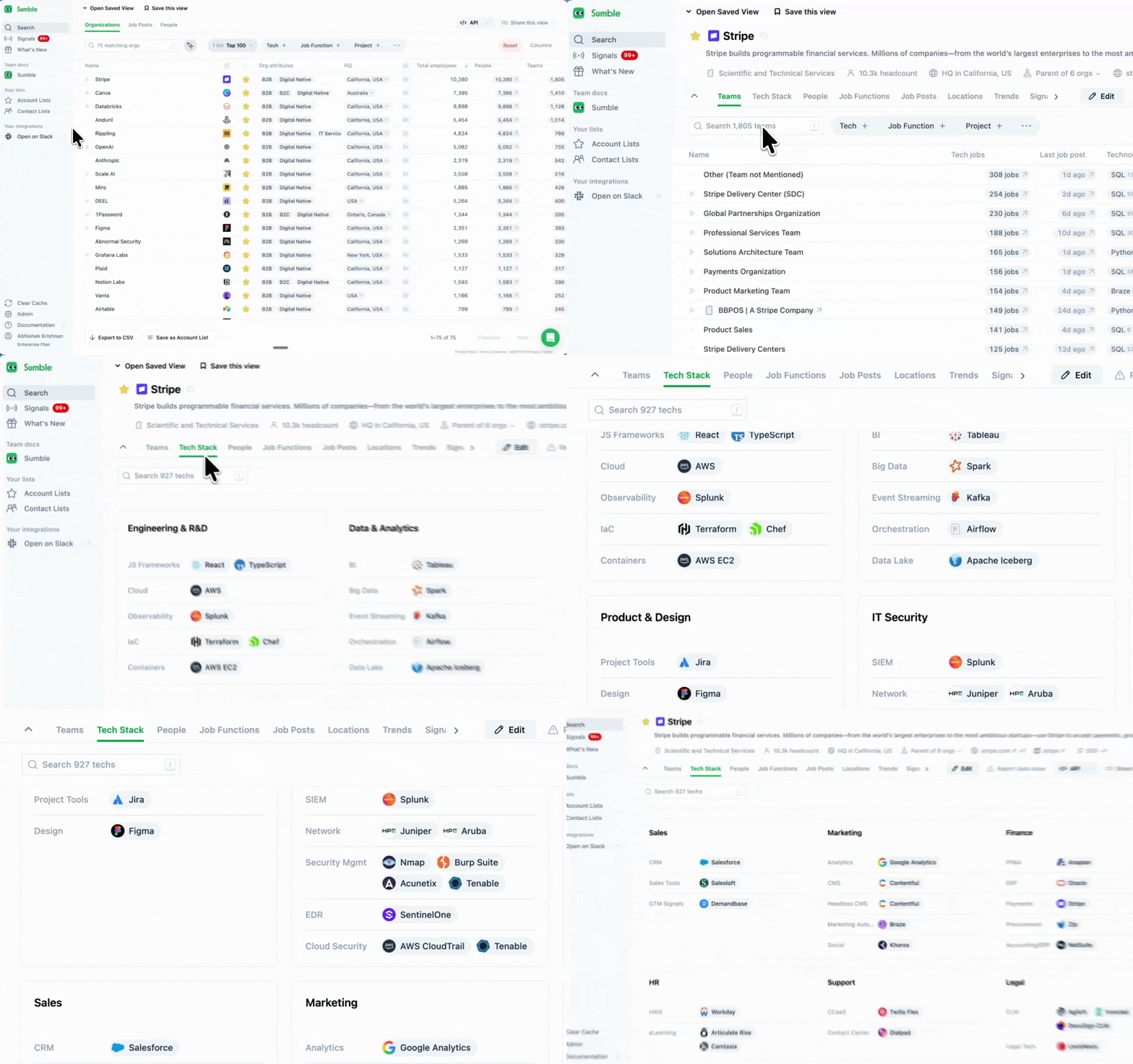
Get the one-liner that makes your email feel relevant.
The Tech Stack tab shows every technology a company uses, organized by team. Not just "uses Snowflake" but which team uses it and what else they run alongside it.
For commercial AEs, this is your quick-grab: a specific, accurate detail that turns a generic email into one that feels 1:1.
Instead of: "Hi, I'm reaching out because I think we could help your team..."
You write: "Saw your data team is running dbt and Snowflake. We've helped similar setups at [reference customer] cut their pipeline build time in half."
Three lines. Specific. Accurate. Sends in 30 seconds.
How to use it:
- Open any account page
- Click the Tech tab
- Find the detail that connects to what you sell
- Drop it into your first line
That's your hook. Don't overthink it. One accurate detail beats three paragraphs of research.
Signals on your accounts: Wake up knowing which accounts to hit
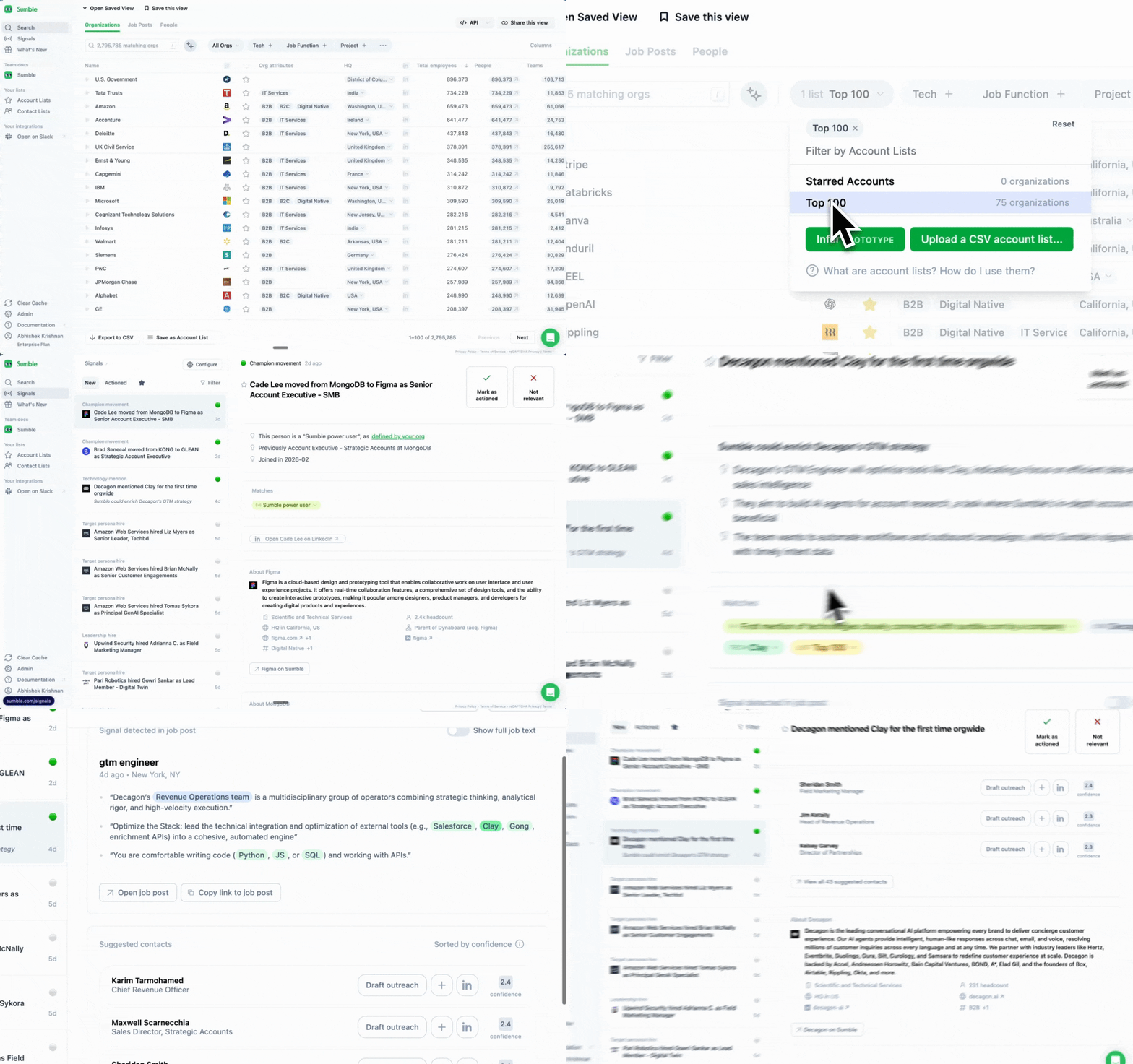
Stop checking LinkedIn manually. Let Sumble watch your accounts for you.
With 200+ accounts, you can't monitor every company page, every job post, every leadership change. Signals do it for you.
Available signals:
- First mention of a technology: A competitor just showed up in their job posts. That's a timing window.
- Champion tracking: Someone you sold to before moved to a new company. Warmest lead you'll get all month.
- New hires: A new VP just joined. New leaders bring new budgets.
- Keyword tracking: They mentioned "vendor consolidation" in a job post. They're shopping.
Each signal comes with the source and a draft outreach message you can customize.
How to use it:
- Select your account list
- Go to Signals
- Choose which signal types you want
- Get notified when something happens
You wake up, check your signals, and know exactly which accounts to hit today. No guessing, no checking six tabs.
Why this works
Most "pitches" and "value propositions" suck. They contain buzzwords and marketing jargon that mean nothing to prospects. "We help companies streamline their operations." Delete.
What gets replies is specificity. A real detail about their company that proves you did your homework. The problem is that homework takes time you don't have.
Sumble does the homework. Job posts are the most reliable public signal of what a company is actually doing. Not their blog, not their press release. What they're hiring for tells you what they're building, buying, prioritizing.
You get the hook. You send the email. You move on.
The daily workflow
You don't need to change how you prospect. Just plug Sumble into your existing prospecting block.
- Signals check (5 min): Open Sumble, check what's changed across your accounts. Any new projects, tech changes, or new hires? Those are today's targets.
- Prospecting block (20 min): Pull up each target account. Grab the hook from the Tech tab or Projects. Drop it into your first line. Send. Next.
- Before a call (2 min): Quick glance at their tech stack and any active projects. You'll sound like you know the account.
That's it. Your relevance trigger in 10 seconds, not 10 minutes. Make 50 emails relevant in the time it used to take you to do 5.
Get started
- Sign up at sumble.com
- Upload your account list
- Apply Tech Filter to find the accounts that matter today
- Before your next prospecting block, grab the hooks from Tech Stack and Projects
- Set up Signals so you know when something changes
Find the hook. Send the email. Book the meeting.
Questions? Set up a strategy call with our experts to get your use case up and running.