
Enterprise AE's guide to Sumble: Cover your book without cutting corners


You have 60 accounts in your book. Maybe 4 hours a week for research.
So you end up doing real prep for the 10 accounts you care about and spray-and-praying the bottom 40. Meanwhile, your competitor found the trigger on account #47 that you never looked at, and now they're in a deal you didn't even know existed.
The math doesn't work. You can't research 60 accounts deeply. But you sell into organizations complex enough that generic outreach gets ignored. A template email to a VP of Engineering at a 2,000-person company? That's getting deleted before they finish the subject line.
You're stuck choosing between depth and coverage. What if you didn't have to?
What Sumble does
Sumble shows you what your target accounts are actually building, buying, and hiring for. It reads job posts and turns them into tech signals, org data, and people intelligence, all the way down to the specific teams that matter. So you can figure out which accounts deserve your time this quarter and what to say when you get there. GTM teams at Snowflake, Figma, Elastic, Wiz, and Vercel use it today.
Here's what that looks like: we know Disney's AI engineering team is building a GenAI project to personalize guest experiences with conversational AI. The project is likely led by Adam Kirstein. We know this because we read it in their job posts, and we show you the source.
The research that took 2 hours now takes 10 minutes. Across your entire book.
Start here: Upload your account list
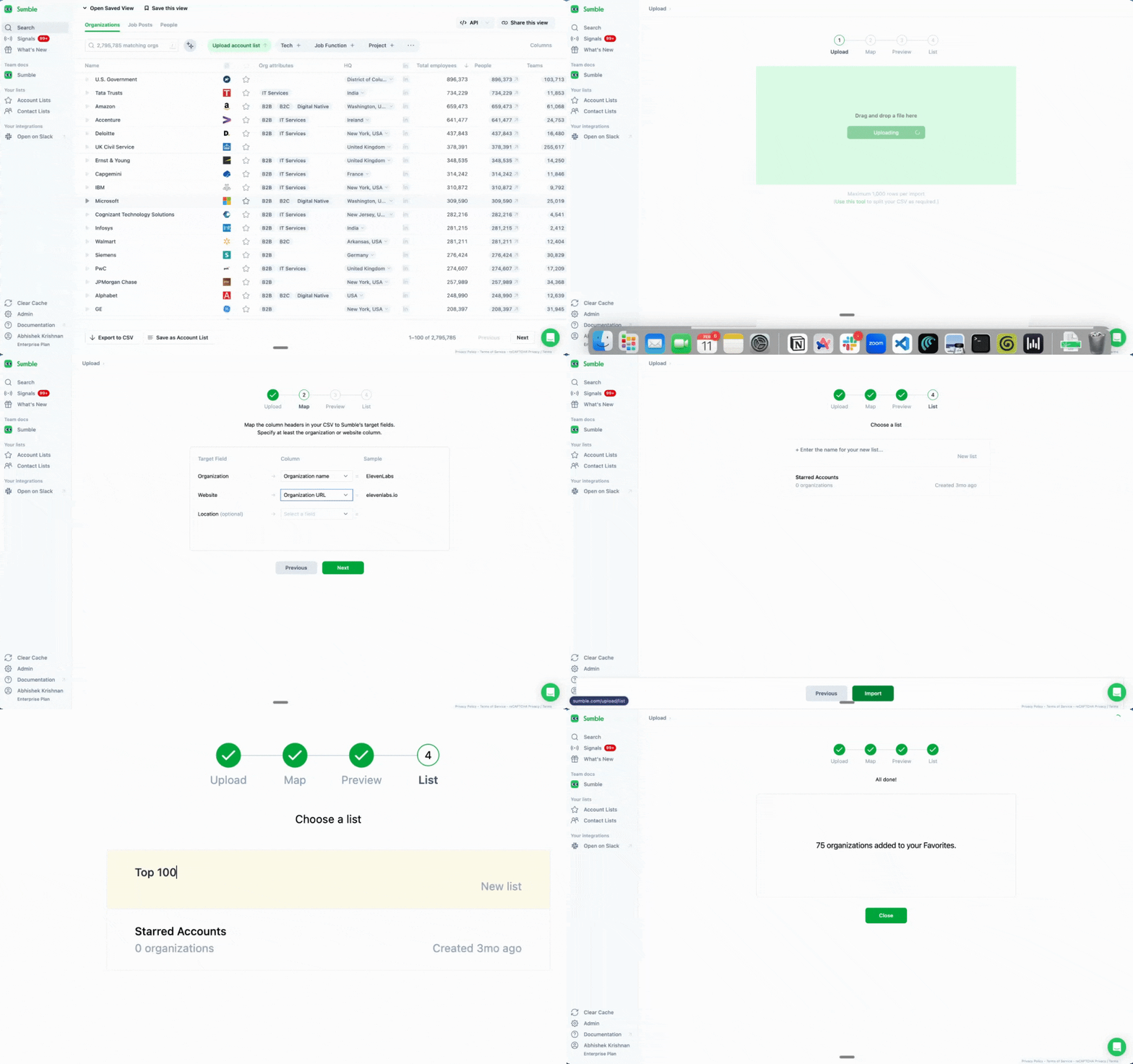
Get your accounts into Sumble first.
Go to sumble.com, sign up with your work email, upload your named accounts. CSV works. Copy-paste works. Just get them in.
Once your accounts are loaded, Sumble becomes your research hub. Every feature below works on your specific book of business. The goal: help you figure out where to focus and what to say when you get there.
Tech filter: Tier your book in minutes
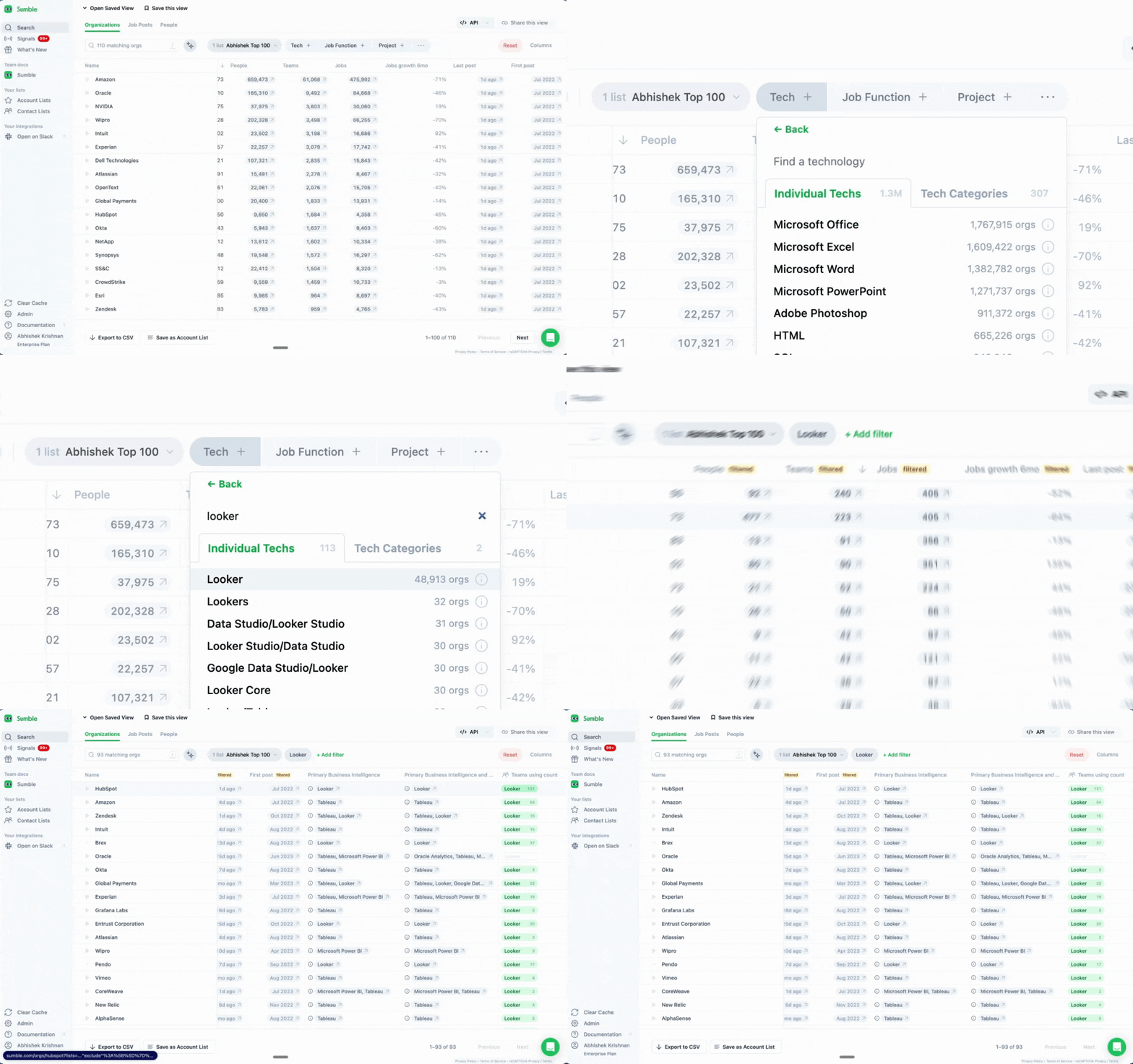
Figure out which accounts to prioritize this quarter.
You sell a BI tool? Filter for companies using Looker, Tableau, or Power BI. Sell security software? Find accounts running Splunk or CrowdStrike.
In mature markets, 85-90% of deals are replacements. Your buyer isn't starting from scratch. Knowing what they currently use tells you two things: this account is in your category, and here's how to position against the incumbent.
Tech Filter turns your full book into a tiered list. The accounts running a competitor's product go to the top. The ones with no tech in your category go to the bottom. Now you know where to spend your 4 hours.
How to use it:
- Go to your account list
- Apply the Tech Filter
- Select competing or complementary technologies
- See which accounts match and which teams use that tech
You just went from 60 unsorted accounts to a prioritized book. Tier 1 gets deep research. Tier 2 gets trigger-based outreach. Tier 3 gets lighter touch until something changes.
Projects: Find which accounts deserve your time this quarter
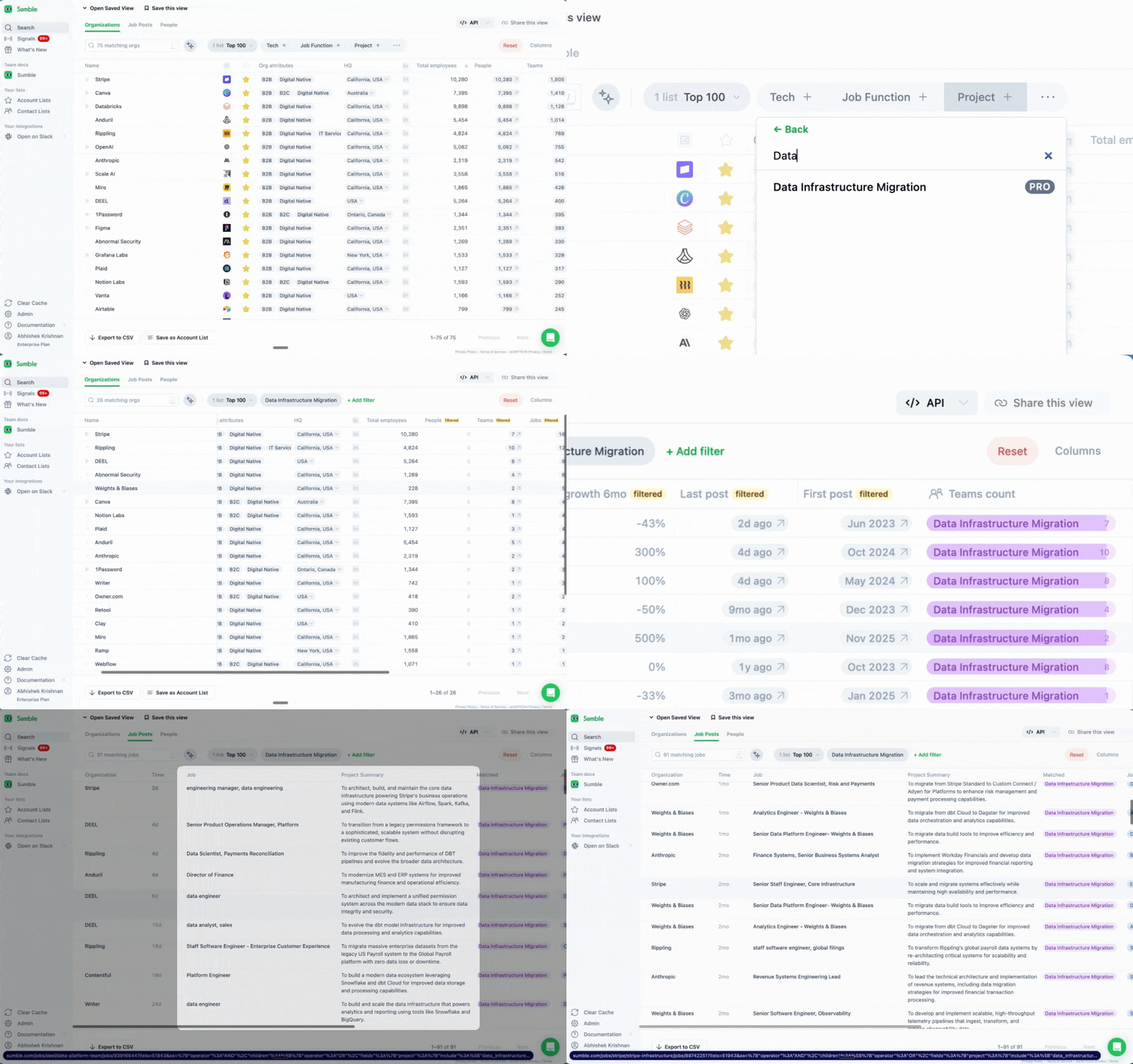
Find the accounts that are actually in-market right now.
This is where prioritization gets real. An enterprise AE at Elastic used Sumble to find companies with active AI search projects. One project at GitLab, surfaced from a single job post, led to a roughly $800K opportunity.
Projects are extracted from job posts. A company hiring a Data Infrastructure Engineer with requirements around "migrating from on-prem to cloud data warehouse"? That's a project. Hiring a Security Engineer to "consolidate SIEM vendors"? Also a project.
This is the buying signal that tells you an account deserves your attention this quarter, not next quarter. They're hiring for it, which means there's budget, there's a team, and there's urgency.
How to use it:
- Filter your accounts by project type (e.g., "Data Infrastructure Migration")
- Click into a project to see the source job post
- See the team and people likely running the project
- Use Draft Outreach to generate a personalized message referencing the project
Stack rank your research triggers: active project, tech change, new hire, funding. Run the list top to bottom. Use the first one you find. First is best.
Tech stack: Do 30 minutes of research in 5
Do 30 minutes of research in 5 minutes.
The Tech Stack tab on any org page shows you every technology used by every team. Not just "this company uses Snowflake" but which team uses it, when they started, what else they run alongside it.
For enterprise AEs, this replaces the tab-switching research loop. No more bouncing between LinkedIn, the company's careers page, BuiltWith, and Google trying to piece together what their stack looks like. It's all here, organized by team.
Instead of: "Hi, I'm calling from Acme. We help companies with their data infrastructure..."
You say: "Hi, I noticed your data platform team is running dbt and Snowflake, and it looks like you added Fivetran last quarter. We've helped similar teams at [reference customer] when they hit that stage. Worth a conversation?"
That's not a cold call. That's a relevant conversation. And it took you 5 minutes to prep, not 30.
How to use it:
- Open any organization page
- Click the Tech tab
- Browse technologies by category
- See which teams use what and when they started
Before any meeting or call, pull up the Tech tab. Five minutes gives you more context than most reps get in a full discovery call.
Signals on your accounts: Catch buying signals across your entire book
Stop missing buying signals because you can't monitor 60 accounts manually.
You can't check every account's career page, LinkedIn feed, and news every week. But when something changes at a target account, that's when your outreach is most likely to land. Signals watch your accounts and tell you when it matters.
Available signals:
- First mention of a technology: A competitor just showed up in their job posts. That's a trigger worth acting on today.
- Champion tracking: Someone you sold to before moved to a new company in your book. That's pipeline.
- New hires: A new VP of Engineering joined a target account. New leaders bring new priorities and new budgets. The first 90 days is when they're most open.
- Keyword tracking: They mentioned "vendor consolidation" or "RFP" in a job post. They're actively evaluating.
Each signal comes with the source and a draft outreach message you can customize.
How to use it:
- Select your account list
- Go to Signals
- Choose which signal types you want
- Get notified when something happens
Signals are how you catch what's happening across your entire book without manually monitoring every account. The accounts that weren't a priority last month might be your best opportunity this month. You'll know.
Why this works
Enterprise AEs waste time in two ways: researching accounts that were never going to buy, and under-researching accounts that were actually in-market.
Job posts are the most reliable public signal of what a company is actually doing. Not what their press release says. Not what their blog claims. What they're hiring for tells you what they're building, buying, and prioritizing.
Sumble reads those posts, extracts the signal, connects it to the people and teams involved. So you can find the trigger and personalize your outreach without the 2-hour research process.
From one enterprise customer: "I look at it like you're networking at an event, but you know exactly what the guy is talking about. You know exactly what projects the company is doing. You're coming with insight attached to their pain."
The weekly workflow
Here's how enterprise AEs get coverage across their book without sacrificing depth.
- Monday (15 min): Check Signals for anything new across your accounts. Reprioritize your week based on what's changed.
- Before every meeting (10 min): Pull up the Tech tab and Projects for the account. You'll walk in knowing more about their stack and initiatives than most of their own employees.
- Prospecting blocks (30 min, 2-3x/week): Filter accounts by tech or project. Find the trigger, personalize the outreach, send. Cover your Tier 2 and Tier 3 accounts without burning hours on each one.
- Monthly (30 min): Re-run Tech Filter on your full book. Accounts shift tiers as their tech and projects change.
Research that took 2 hours per account now takes 10 minutes. You cover your entire book with the kind of personalization that used to be reserved for your top 5 accounts.
Get started
- Sign up at sumble.com
- Upload your account list
- Apply Tech Filter to tier your accounts
- Before your next call, check the Tech tab and Projects
- Set up Signals to catch buying signals across your whole book
Know which accounts to prioritize. Know what to say when you get there.
Questions? Set up a strategy call with our experts to get your use case up and running.