
SDR's guide to prospecting: Stop dialing blind, start booking meetings


You cold called for 3 hours today. Hit 67 voicemails, a fax machine, two gatekeepers, and one guy who told you to get a real job.
You made your dials. You hit your activity quota. And you booked zero meetings.
Meanwhile, the rep sitting next to you made half the dials and booked three. Same list. Same product. Same pitch. Different results.
The difference isn't effort. You're not getting outworked. You're getting out-researched. They know which accounts are actually in-market. They have direct dials instead of main lines. They have the hook that makes the prospect pause instead of hang up.
The average SDR books 2 meetings a month. Top reps book 18. That gap isn't talent. It's data.
What Sumble does
Sumble shows you what your target accounts are actually building, buying, and hiring for. It reads job posts and turns them into tech signals, org data, and people intelligence, all the way down to the specific teams that matter. So you get the trigger, the hook, and the context you need without spending 20 minutes researching one account. GTM teams at Snowflake, Figma, Elastic, Wiz, and Vercel use it today.
Here's what that looks like: we know Disney's AI engineering team is building a GenAI project to personalize guest experiences with conversational AI. The project is likely led by Adam Kirstein. We know this because we read it in their job posts, and we show you the source.
That's your hook. That's the difference between a voicemail and a conversation.
Start here: Upload your account list
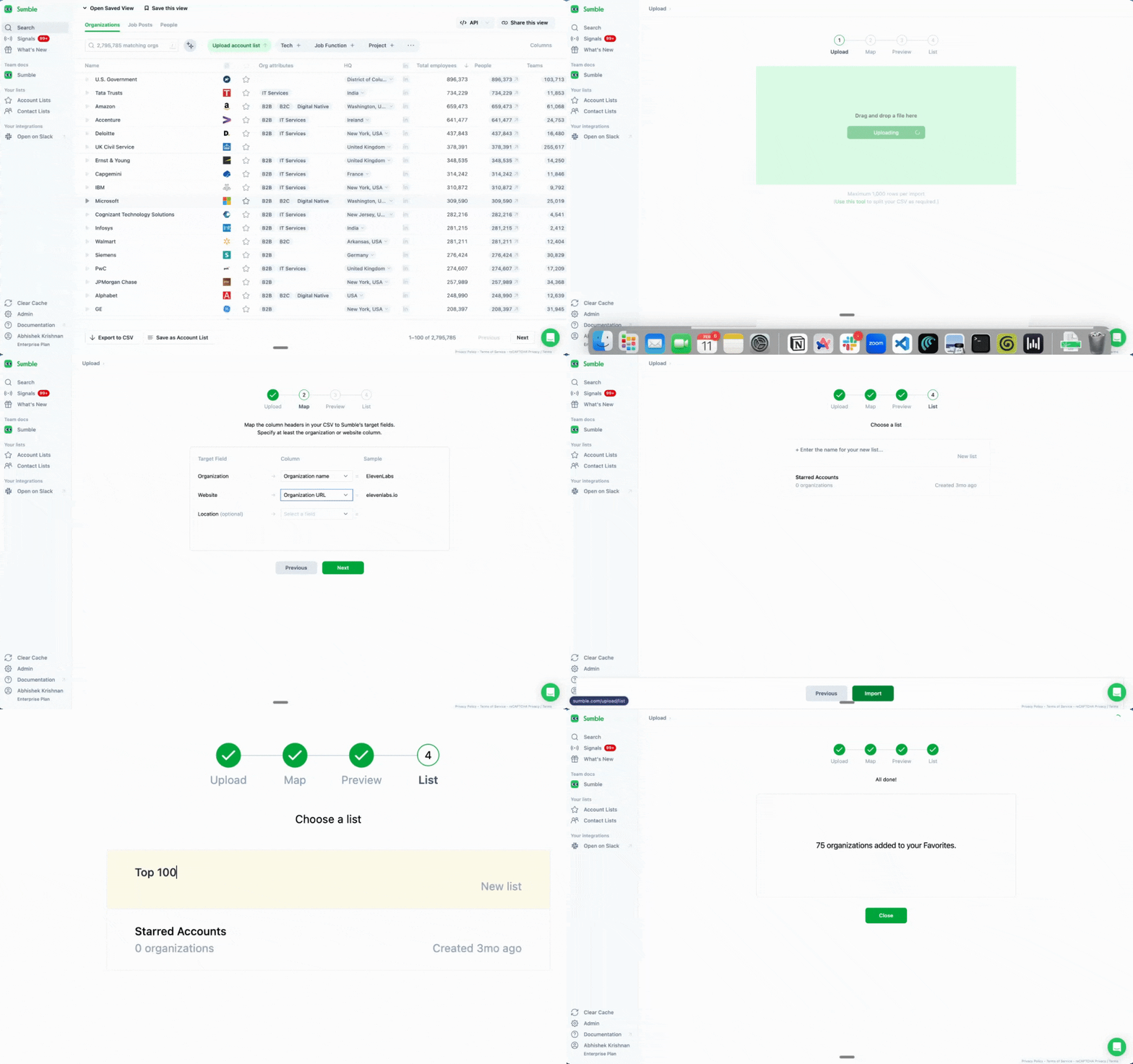
Get your accounts into Sumble first.
Go to sumble.com, sign up with your work email, upload your accounts. CSV works. Copy-paste works. Just get them in.
Once your accounts are loaded, every feature below works on your specific list. No more tab-switching between LinkedIn, ZoomInfo, the company website, and their careers page. Your accounts, your triggers, your hooks. One place.
Tech filter: Build today's call list in 60 seconds
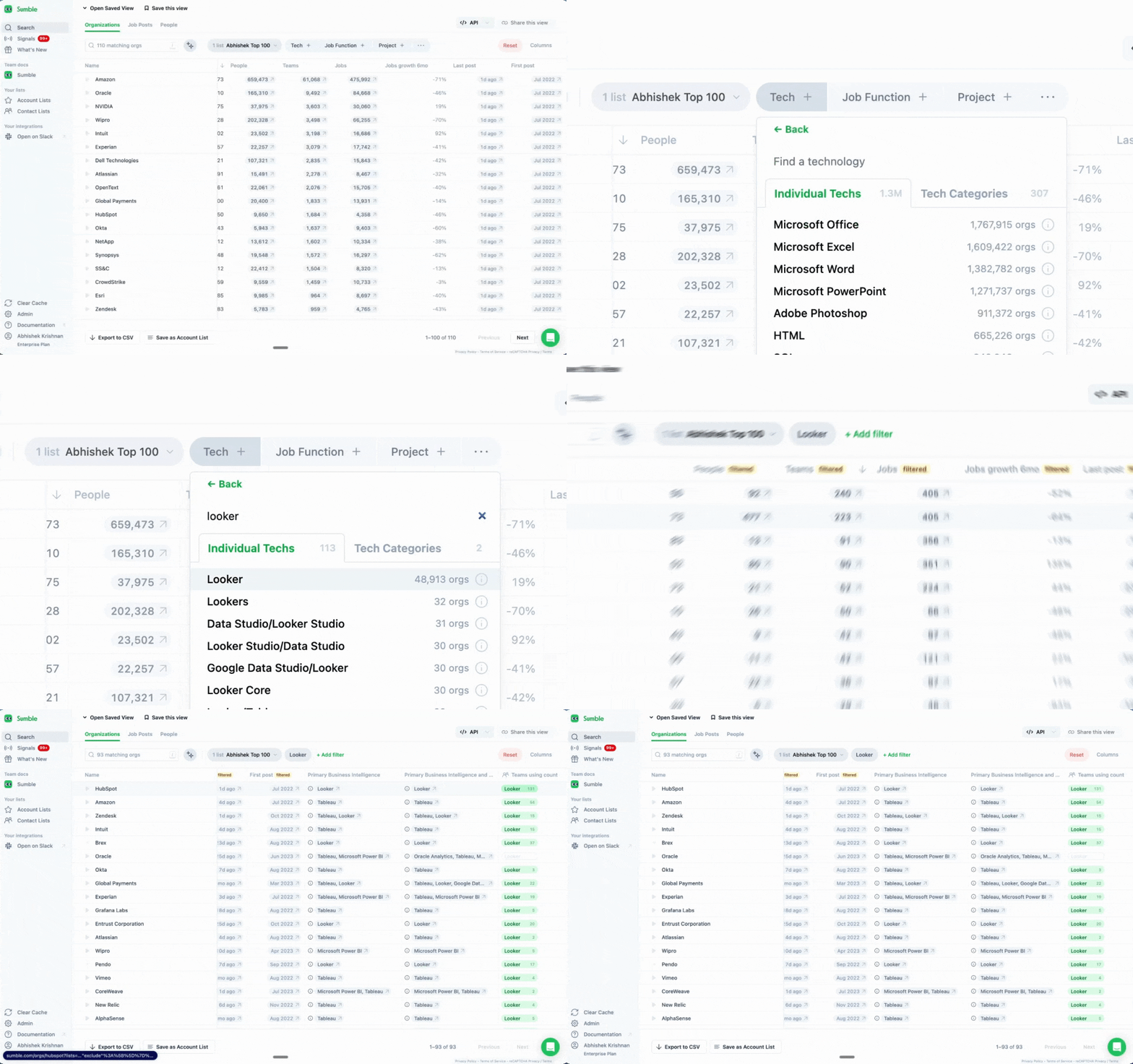
Figure out which accounts to call today.
You have 200 accounts in your list. You can't research all of them. You can't even dial all of them. So which ones do you start with?
Tech Filter answers that. Sell a BI tool? Filter for companies using Looker, Tableau, or Power BI. Sell security software? Find accounts running Splunk or CrowdStrike.
In mature markets, 85-90% of deals are replacements. Your buyer already uses something in your category. Knowing what they use gives you two things: a reason to call and something to say when they pick up.
Instead of 200 accounts and no clue where to start, you have 30 accounts that are actually relevant. That's your call list for the day.
How to use it:
- Go to your account list
- Apply the Tech Filter
- Select competing or complementary technologies
- See which accounts match
You just cut your list down to the accounts that matter. More conversations per dial. Fewer voicemails into the void.
Projects: Find the trigger that books meetings
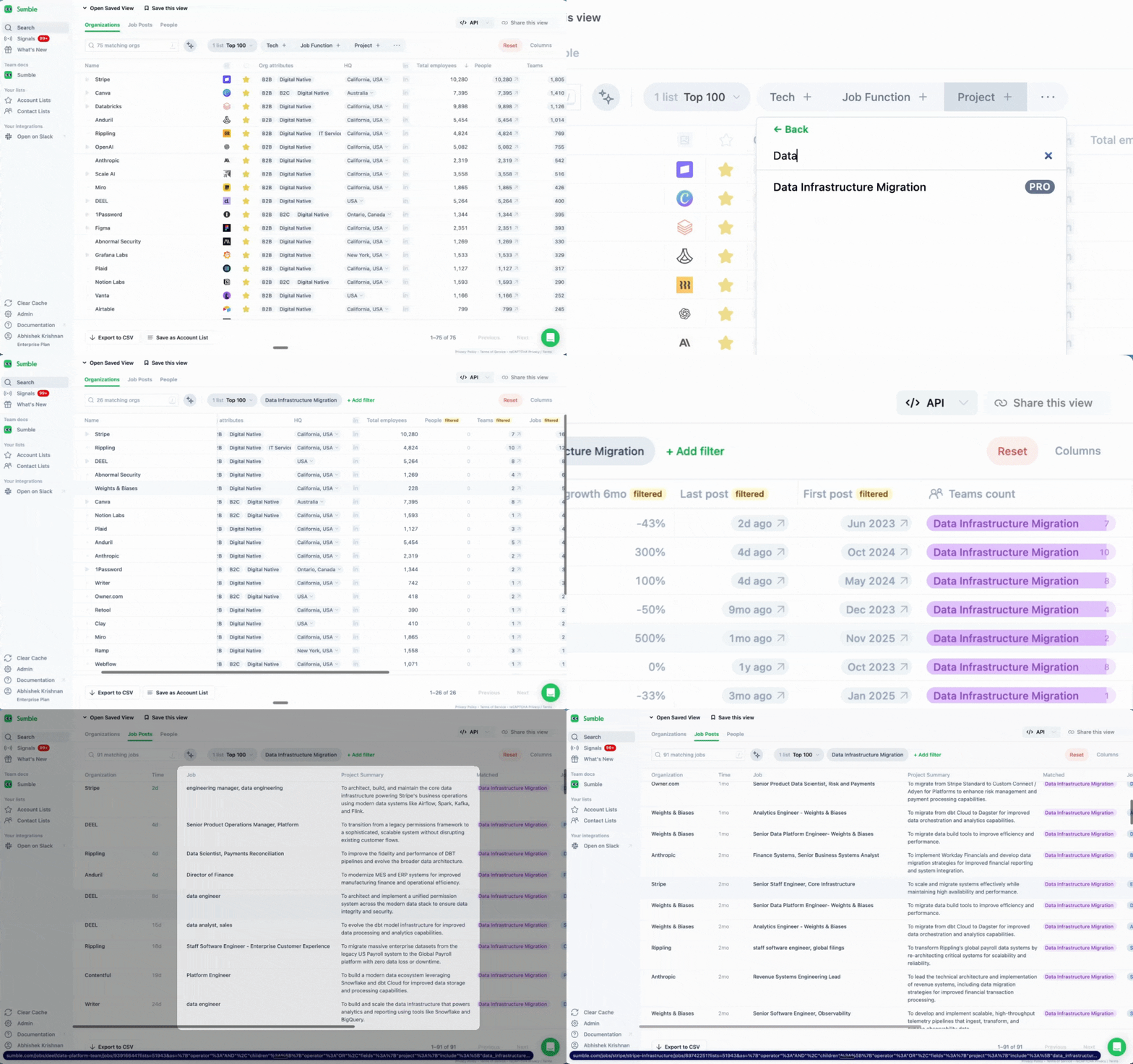
Find the accounts where something is actually happening.
This is the trigger that books the meeting. A company hiring a Data Infrastructure Engineer to "migrate from on-prem to cloud data warehouse"? That's a project. Hiring a Security Engineer to "consolidate SIEM vendors"? Also a project. They're spending money. They're building a team. They have urgency.
When you call an account with an active project, you're not cold calling. You're calling someone who has the problem you solve right now.
An enterprise AE at Elastic used Sumble to find companies with active AI search projects. One project at GitLab, surfaced from a single job post, led to a roughly $800K opportunity. That started with an SDR finding the trigger.
How to use it:
- Filter your accounts by project type
- Click into a project to see the source job post
- Grab the hook: the project name, the team, the likely lead
- Use Draft Outreach to generate a message referencing the project
Now you have a first line that isn't "I'd love to learn more about your priorities." It's: "Saw your team is staffing up for a cloud migration. That's usually when teams run into X." That gets a response.
Tech stack: The 10-second detail that makes them pause
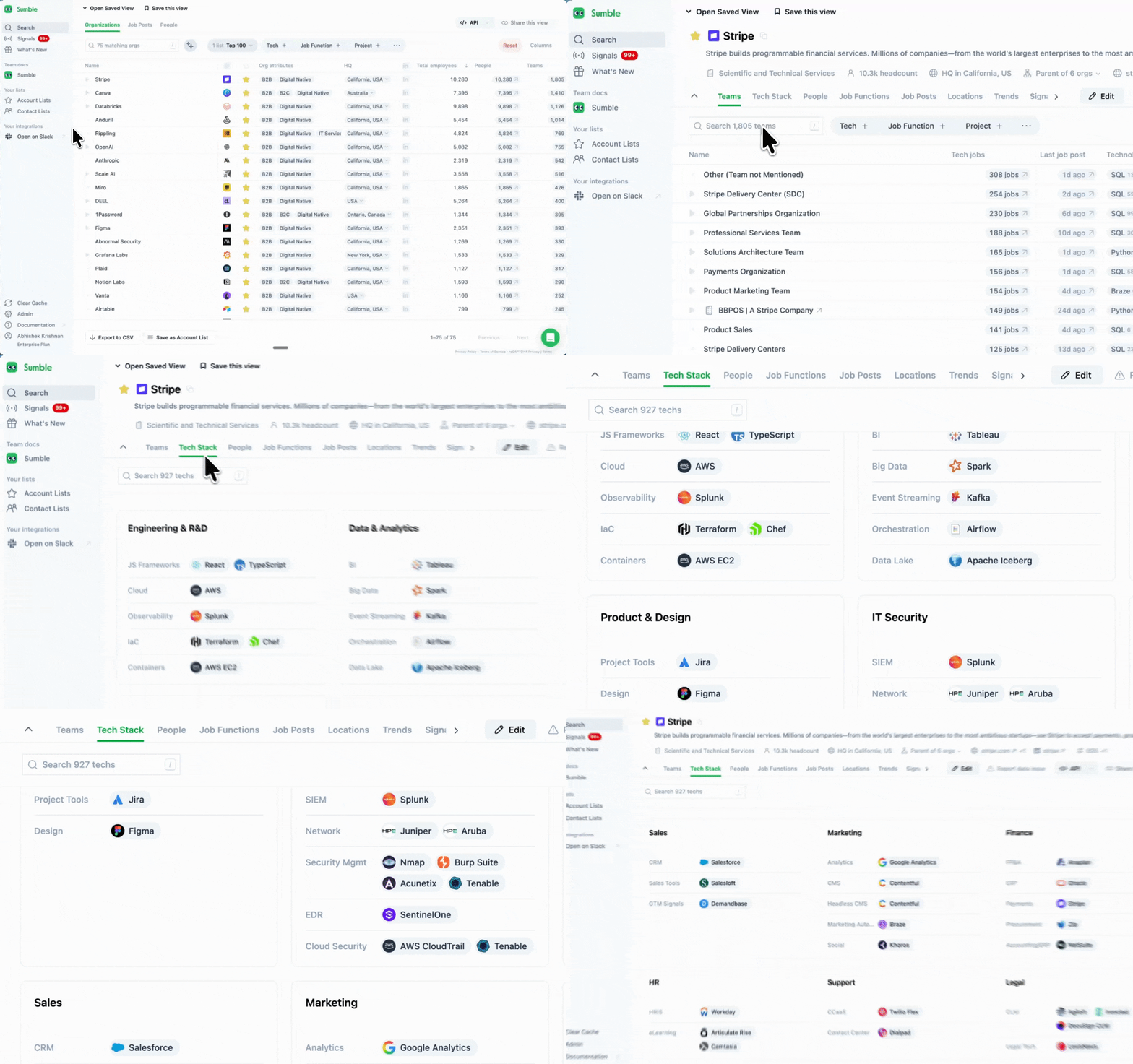
Get the 10-second personalization that makes your email feel researched.
The Tech Stack tab shows every technology a company uses, organized by team. Not just "uses Snowflake" but which team uses it and what they run alongside it.
For SDRs, this is your fastest personalization grab. You don't need to spend 20 minutes researching an account. You need one specific, accurate detail that makes your outreach stand out from the 50 other emails they got today.
Instead of: "Hi, I'm reaching out because I think our solution could help your team..."
You write: "Saw your data team is running dbt and Snowflake. We've helped similar setups at [reference customer] when they hit [specific problem]. Worth 15 minutes?"
Three lines. Specific. Done in 30 seconds. That's the email that gets a reply.
How to use it:
- Open any account page
- Click the Tech tab
- Find the detail that connects to what you sell
- Drop it into your first line
That's it. One detail beats a paragraph of research. A good cold email is 3 bodies of text, no more than 3 lines each. Add one personalization hook upfront without changing the rest of your sequence. Move on.
Signals on your accounts: Your hotlist, delivered every morning
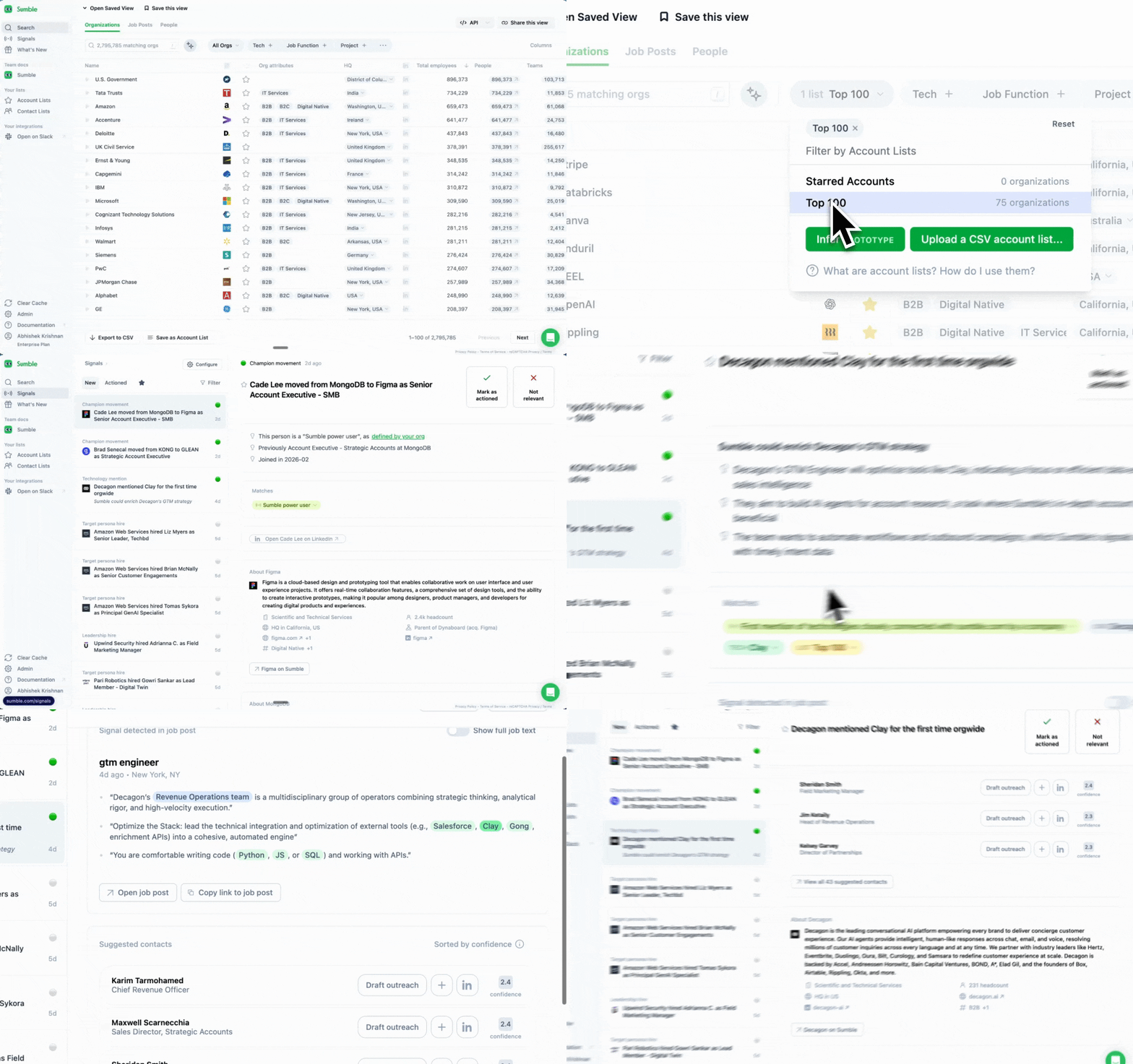
Let Sumble watch your accounts so you can spend your time dialing.
You can't check 200 company career pages every week. You can't monitor LinkedIn for every leadership change. But when something happens at an account, that's when your outreach actually works.
Available signals:
- First mention of a technology: A competitor just showed up in their job posts. They're evaluating. Call now.
- Champion tracking: Someone your AE sold to before just moved to a new company. That's a warm intro waiting to happen.
- New hires: A new VP just started. New leaders want to make an impact in the first 90 days. They're more open to taking meetings than they'll be in 6 months.
- Keyword tracking: They mentioned "vendor consolidation" or "RFP" in a job post. They're shopping.
- ......
Each signal comes with the source and a draft outreach message.
How to use it:
- Select your account list
- Go to Signals
- Choose which signal types you want
- Get notified when something happens
Check signals every morning. That's your hot list for the day. These aren't cold calls anymore. These are accounts where something just happened and your timing is perfect.
Why this works
The #1 rep is never #1 on the activity board. They don't make the most dials. They make the smartest ones.
Top SDRs connect on 13.3% of dials. Average reps? 5.4%. Top reps need 50 dials to book a meeting. Average reps need 400. Same product, same territory, same hours in the day.
The difference: top reps know which accounts are in-market, have direct dials to the right people, and have a hook that makes the prospect stop and listen.
Job posts are the most reliable public signal of what a company is actually doing. Not their blog. Not their press release. What they're hiring for tells you what they're building, buying, and prioritizing. Sumble reads those posts and gives you the triggers, the context, and the hooks you need. So every dial counts.
The daily workflow
You don't need to change your prospecting block. Just make it smarter.
- Morning check (5 min): Open Sumble, check Signals. Any new projects, tech changes, or new hires at your accounts? Those go to the top of today's call list.
- List prep (10 min): Pull up today's accounts. Grab the hook from Tech Stack or Projects. One detail per account. Don't overthink it.
- Call block (1-3 hours): Dial with context. When someone picks up, you know what their team is building and why you're calling.
- Email block (30 min): For the accounts that didn't pick up, drop the hook into your sequence. One personalization paragraph up top, keep the rest of the template the same.
Research that used to take 30 minutes now takes 30 seconds. That's 25 extra dials per day. That's the difference between 2 meetings a month and 10.
Get started
- Sign up at sumble.com
- Upload your account list
- Apply the Tech Filter to find the accounts that actually matter
- Before your next call block, grab the hooks from Tech Stack and Projects
- Set up Signals so you know when something changes
Stop dialing blind. Start booking meetings with deep account research.
Questions? Set up a strategy call with our experts to get your use case up and running.