
Strategic AE's guide to Sumble: See the full picture before first contact


You spent 3 weeks building a relationship with your "champion."
She liked your product. She took your calls. She introduced you to her team. You built the business case around her priorities.
Then you found out in the eleventh hour that she doesn't have budget authority. Her VP was never briefed on the deal. And the actual economic buyer, two levels up in a different business unit, just signed with your competitor last week.
You sold for 6 months and had no idea where you actually stood.
When you're managing 5-15 named accounts with deal sizes north of $500K, you can't afford that. Every deal matters. Every stakeholder you miss is a quarter you don't hit.
The problem isn't effort. You're willing to spend 20 hours researching an account before first outreach. The problem is that the information you need, the real power structure, the actual buying committee, the initiatives that matter to the C-suite, isn't sitting on LinkedIn or the company website.
What if you could see the full picture before your first meeting?
What Sumble does
Sumble shows you what your target accounts are actually building, buying, and hiring for. It reads job posts and turns them into tech signals, org data, and people intelligence, all the way down to the specific teams that matter. So you can map the people, teams, and initiatives inside an account before your first conversation. GTM teams at Snowflake, Figma, Elastic, Wiz, and Vercel use it today.
Here's what that looks like: we know Disney's AI engineering team is building a GenAI project to personalize guest experiences with conversational AI. The project is likely led by Adam Kirstein. We know this because we read it in their job posts, and we show you the source.
That's the kind of intelligence that helps you build a point of view before the executive meeting, not during it.
Start here: Upload your account list
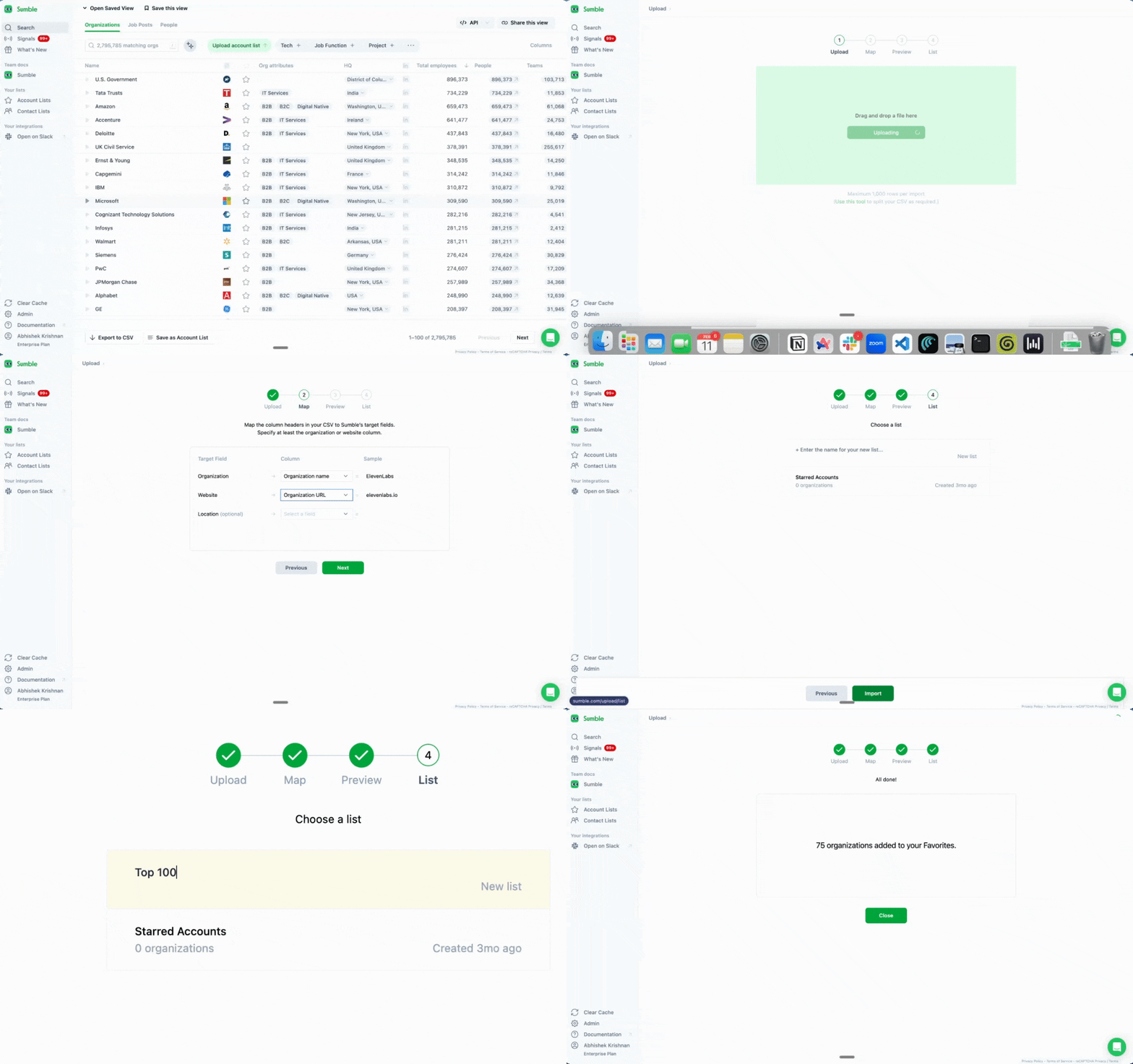
Get your accounts into Sumble first.
Go to sumble.com, sign up with your work email, upload your named accounts. CSV works. Copy-paste works. Just get them in.
Once your accounts are loaded, Sumble becomes your account planning hub. Every feature below works on your specific named accounts, giving you the depth you need to map the org, identify the buying committee, and build a credible POV before first contact.
Tech filter: Map the technology landscape across the buying committee
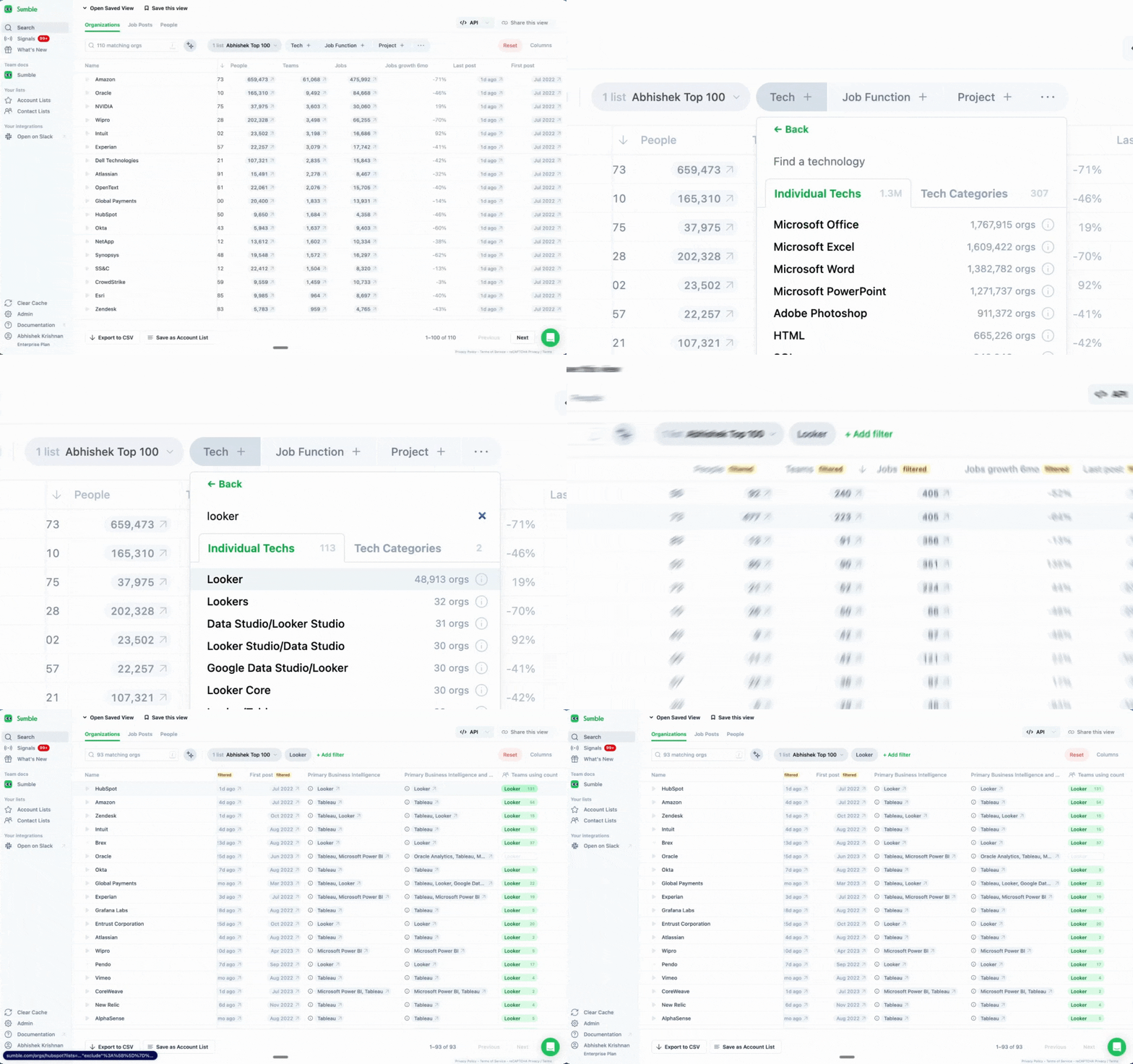
Map the technology landscape across your named accounts.
For strategic deals, knowing that a company "uses Snowflake" isn't useful. Knowing which business units use it, which teams depend on it, and what they're running alongside it, that's what shapes your account plan.
In mature markets, 85-90% of deals are replacements. Your buyer is switching from something, and the incumbent is embedded across multiple teams and business units. Tech Filter shows you the full scope: how deep the current vendor goes and where the gaps are.
This is where you start building your power map. If their data platform team uses your competitor but their analytics engineering team uses something else entirely, those are different stakeholders with different priorities. That's your multithreading strategy.
How to use it:
- Go to your account list
- Apply the Tech Filter
- Select technologies relevant to your deal strategy
- See which accounts match and, critically, which teams within those accounts use what
For each of your named accounts, map out the technology landscape by team. This tells you where the incumbent sits, where the whitespace is, and which business units to approach first.
Projects: Find the initiatives that get you to the C-suite
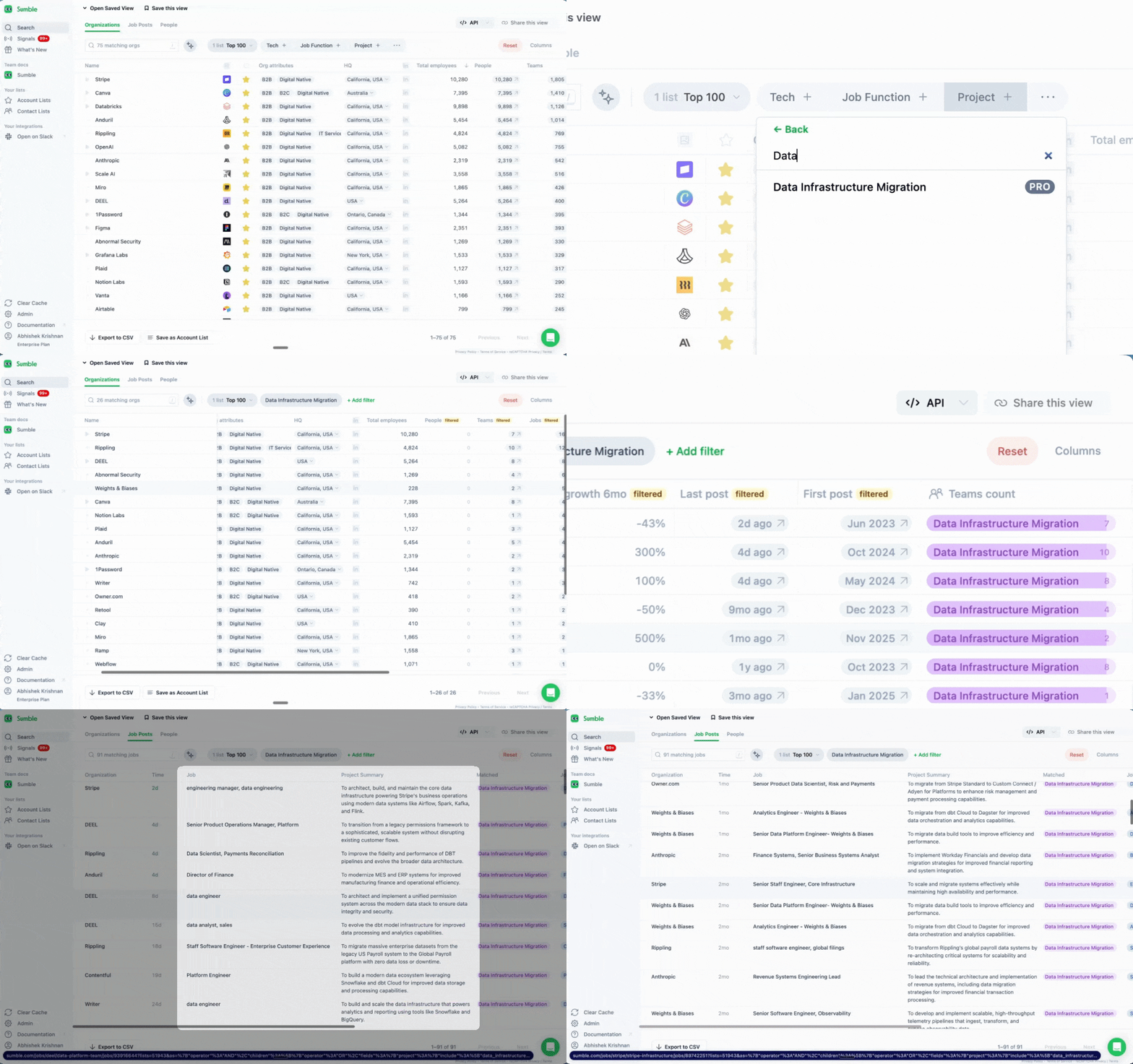
Find the strategic initiatives that justify executive engagement.
At this level, you're not selling features. You're aligning to the million-dollar business priorities that are already top of mind for the organization. Projects help you find those priorities.
An enterprise AE at Elastic used Sumble to find companies with active AI search projects. One project at GitLab, surfaced from a single job post, led to a roughly $800K opportunity. For strategic accounts, the same intelligence applied to a larger org means you can tie your solution to an initiative the CEO mentioned on the last earnings call.
Sumble extracts projects from job posts and tells you:
- What the project is about
- Which team is running it
- Who likely leads that team
When you walk into an executive meeting and say, "I know your data platform team is running a cloud migration, and it looks like it's being led out of [name]'s group," you've earned the right to have a strategic conversation. You're not pitching. You're demonstrating that you understand their business.
How to use it:
- Filter your accounts by project type
- Click into a project to see the source
- Map the project to the team and leadership involved
- Connect it to the executive priorities you've gathered from earnings calls, annual reports, or press
Build your POV around the projects that ladder up to executive priorities. That's how you get to power without getting blocked by the wrong champion.
Tech stack: Build the org map that wins complex deals
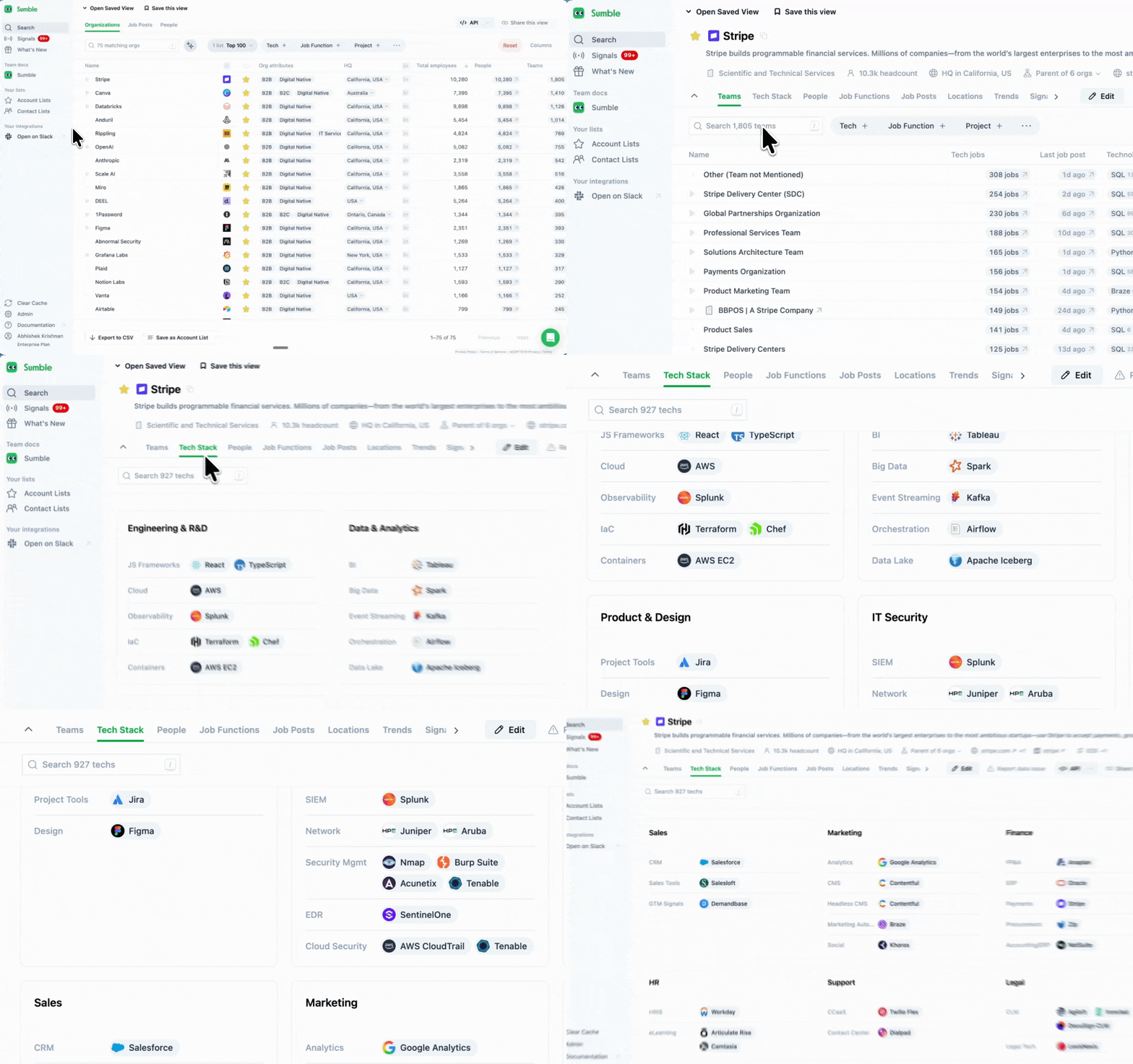
Build the org intelligence that wins complex deals.
The Tech Stack tab shows every technology used by every team within an organization. For strategic AEs, this is your org mapping tool.
When you can see that the data engineering team runs Snowflake and dbt, the analytics team runs Looker, and the ML team recently added Databricks, you're not just seeing technology. You're seeing organizational structure. Budget ownership. Team maturity. Where they're investing and where they're consolidating.
This is how you identify the full buying committee before your first meeting. The data engineering team lead has different priorities than the VP of Analytics, who has different priorities than the CTO. Knowing what each team runs tells you what each stakeholder cares about.
How to use it:
- Open any organization page
- Click the Tech tab
- Map technologies to teams and leadership
- Identify the stakeholders across each team who would be part of a buying decision
Before any executive meeting, spend time on the Tech tab. Map out which teams use what, who leads those teams, and how their technology decisions connect to the strategic priorities you're selling into. This is how you show up prepared. This is how you build credibility with the C-suite.
Signals on your accounts: See changes coming before they derail your deal
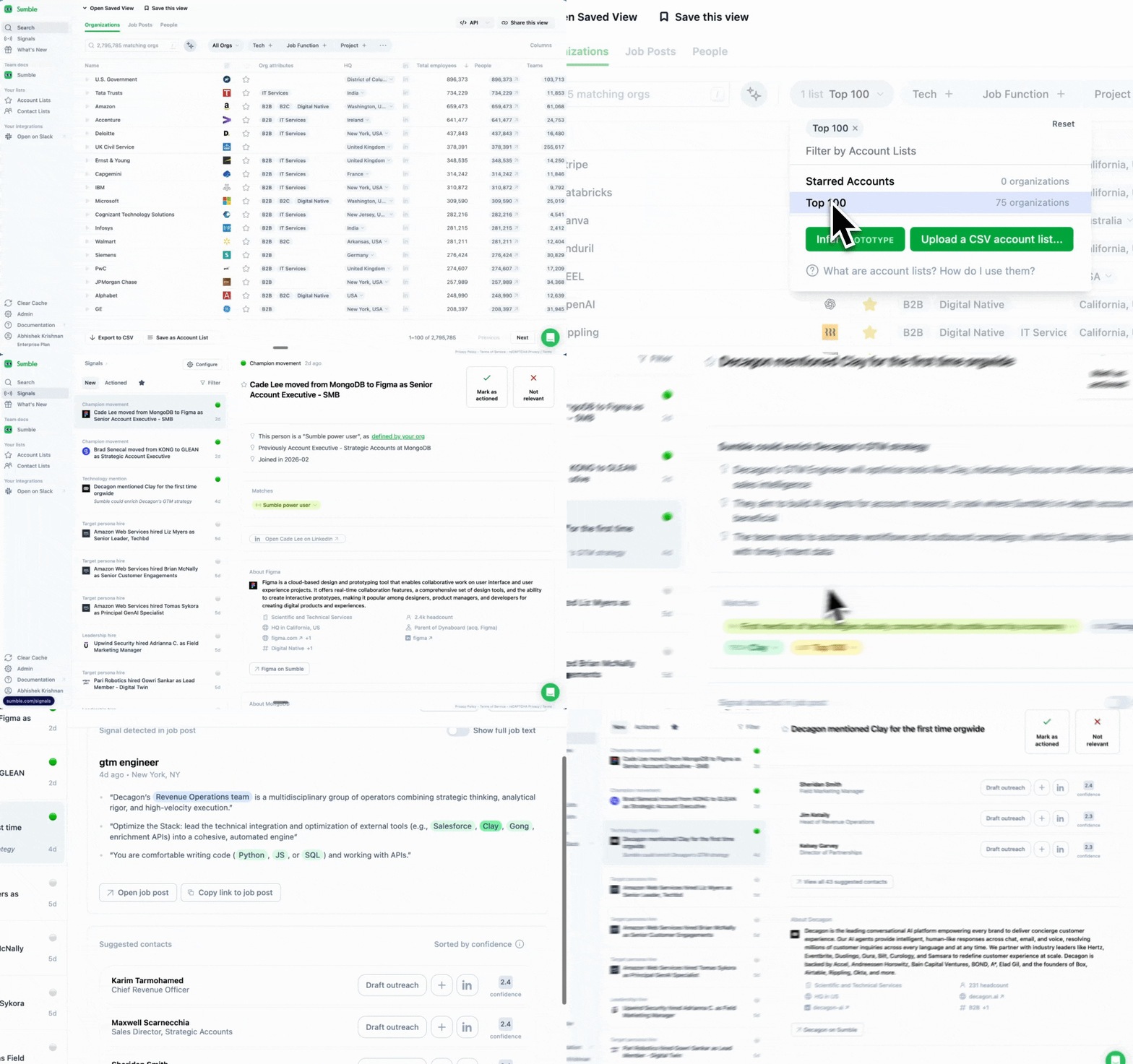
Don't get blindsided by changes you should have seen coming.
With 5-15 named accounts and 9-18 month sales cycles, surprises kill deals. A reorg you didn't know about. An executive departure. A competitor showing up in job posts. These are the things that derail quarters.
Signals watch your named accounts for you.
Available signals:
- First mention of a technology: A competitor just appeared in their job posts. Your incumbent position may be at risk, or there's a new opportunity to position against.
- Champion tracking: Your champion moved to a different company. Either you need to rebuild relationships in the existing account, or you have a warm entry into a new one.
- New hires: A new CTO or VP joined. Executive transitions shift priorities, reset vendor relationships, and open windows that close fast.
- Keyword tracking: They mentioned "vendor consolidation," "strategic review," or "RFP" in a job post. Something is happening.
Each signal comes with the source and context.
How to use it:
- Select your named accounts
- Go to Signals
- Enable all signal types for your strategic accounts
- Review signals weekly as part of your account planning rhythm
For strategic accounts, every signal matters. A new executive joining your target account is worth rethinking your entire account plan. A competitor appearing in job posts might mean your multithreading strategy needs to accelerate. Signals make sure you see it before it becomes a problem.
Why this works
Strategic selling is about intelligence. The AE who understands the org, the power structure, the active initiatives, and the executive priorities is the one who wins. The one who's guessing is the one who gets blindsided.
Job posts are the most reliable public signal of what a company is actually doing. Not their press release. Not their blog. What they're hiring for tells you what they're building, where they're investing, and what teams are growing. Sumble reads those posts, extracts the context, and connects it to the people and organizational structure.
The account intelligence that used to take weeks of LinkedIn stalking, earnings call reviews, and industry networking gets delivered before your first meeting. You don't skip the relationship-building. You show up to it better prepared than anyone else in the room.
From one customer: "I look at it like you're networking at an event, but you know exactly what the guy is talking about. You know exactly what projects the company is doing. You're coming with insight attached to their pain."
The account planning workflow
As a Strategic AE you do deep account planning. Here's how Sumble fits into that.
- New account onboarding (1-2 hours): When you get a new named account, map the full picture in Sumble. Tech stack by team, active projects, key people. Build your initial power map and identify the stakeholders who will form the buying committee.
- Weekly account review (20 min): Check Signals for changes across your named accounts. Any new projects, executive hires, or technology changes should update your account plan.
- Pre-meeting prep (15 min): Before any executive meeting, review the Tech tab and Projects. Build your POV around their priorities, not yours. Know what the attendees' teams are working on so you can speak to their specific concerns.
- Quarterly account plan refresh (1-2 hours): Re-map the org. Check what's changed in their tech stack, which projects have started or completed, whether the buying committee has shifted.
Sumble compresses weeks of manual research into hours. The time you save on gathering intelligence, you reinvest in building the relationships that close 7-figure deals.
Get started
- Sign up at sumble.com
- Upload your named accounts
- Map the tech stack by team for your top accounts
- Before your next executive meeting, build your POV using Projects and Tech Stack
- Set up Signals on every named account
See the full picture. Get to power. Win the deal.
Questions? Set up a strategy call with our experts to get your use case up and running.